'이것이 C#이다 개정판'의 chapter 11을 정리한 글입니다.
일반화 프로그래밍 (Generic Programming)
일반화 프로그래밍은 특정 데이터 타입에 묶이지 않고 알고리즘이나 자료구조를 일반적인 형태로 일반화(Generalization)하여, 여러 데이터 타입에서 재사용할 수 있도록 하는 프로그래밍 기법입니다.
일반화를 진행하는데에는 형식 매개변수가 필요한데, 형식 매개변수는 주로 T로 사용되지만, 꼭 T여야만 하는 것은 아닙니다.
일반화 메서드
정수형 배열과 문자열 배열을 복사하는 메서드가 필요하다고 할 때, 아래의 코드를 작성할 수 있습니다.
// int 버전
void CopyArray(int[] source, int[] target)
{
    for (int i = 0; i <source.Length; ++i)
        target[i] = source[i];
}
// string 버전
void CopyArray(string[] source, string[] target)
{
    for (int i = 0; i <source.Length; ++i)
        target[i] = source[i];
}
이렇게 구현부는 동일하지만, 데이터 형식이 다른 메서드 두 개가 완성되었습니다.
이렇게 두 개의 데이터 형식만 필요하면 다행이지만, 앞으로 수 십개의 데이터 형식이 필요할 수도 있습니다.
이를 위한 것이 일반화 메서드입니다.
[문법]
한정자 반환_형식 메서드이름<형식_매개변수> (매개변수_목록)
{
    // ...
}
해당 문법처럼, 위의 메서드를 일반화시키면 아래의 코드와 같습니다.
void CopyArray<T> (T[] source, T[] target)
{
    for (int i  = 0; i < source.Length; ++i)
        target[i] = source[i];
}
형식 매개변수 T를 사용하여, 컴파일러가 추후 일반화 메서드의 나머지 부분에 대해서 T를 형식 매개변수 값으로 치환합니다.
[예제]
using System;
using System.Collections;
using static System.Console;

namespace GenericMethod
{
    class MainApp
    {
        static void CopyArray<T>(T[] source, T[] target)
        {
            for (int i = 0; i < source.Length; ++i)
                target[i] = source[i];
        }

        static void Main(string[] args)
        {
            int[] source = { 1, 2, 3, 4, 5 };
            int[] target = new int[source.Length];

            // int형으로 일반화 메서드 사용
            CopyArray<int>(source, target);

            foreach (int element  in target)
                Console.WriteLine(element);


            string[] source2 = { "하나", "둘", "셋", "넷", "다섯" };
            string[] target2 = new string[source2.Length];

            // string형으로 일반화 메서드 사용
            CopyArray<string>(source2, target2);

            foreach (string element in target2)
                Console.WriteLine(element);
        }
    }
}
일반화 클래스
일반화 클래스 역시 데이터 형식을 일반화한 클래스입니다.
class 클래스이름 <형식_매개변수>
{
    // ...
}
일반화 클래스 역시 컴파일 시, 컴파일러가 클래스의 형식 매개변수 T를 객체를 생성할 때 입력받은 형식으로 치환하여 컴파일합니다.
[예제]
using System;
using System.Collections;
using static System.Console;

namespace GenericClass
{
    class MyList<T>
    {
        private T[] array;

        public MyList()
        {
            array = new T[3];
        }

        public T this[int index]
        {
            get
            {
                return array[index];
            }
            set
            {
                if (index >= array.Length)
                {
                    Array.Resize<T>(ref array, index + 1);
                    Console.WriteLine($"Array Resized : {array.Length}");
                }

                array[index] = value;
            }
        }

        public int Length
        {
            get {  return array.Length; }
        }
    }

    class MainApp
    {
        static void CopyArray<T>(T[] source, T[] target)
        {
            for (int i = 0; i < source.Length; ++i)
                target[i] = source[i];
        }

        static void Main(string[] args)
        {
           MyList<string> str_list = new MyList<string>();
            str_list[0] = "abc";
            str_list[1] = "def";
            str_list[2] = "ghi";
            str_list[3] = "jkl";
            str_list[4] = "mno";

            for (int i = 0; i < str_list.Length; ++i)
                Console.WriteLine(str_list[i]);

            Console.WriteLine();

            MyList<int> int_list =  new MyList<int>();
            int_list[0] = 0;
            int_list[1] = 1;
            int_list[2] = 2;
            int_list[3] = 3;
            int_list[4] = 4;
            for (int i  =0; i < int_list.Length; ++i)
                Console.WriteLine(int_list[i]);
        }
    }
}
특정 조건을 갖춘 형식에만 대응하는 형식 매개변수
형식 매개변수는 모든 형식에 대응이 가능하지만, 종종 특정 조건을 갖춘 형식에만 대응하는 형식 매개변수가 필요할 때도 있습니다.
일반화 코드에서 형식을 제약하는 문법은 다음과 같으며, 형식 매개변수에 대한 일반화 클래스나 일반화 메드 모두에 동일하게 사용됩니다.
[문법]
where 형식 매개변수 : 제약조건
예를 들어 MyList<T> 클래스의 형식 매개변수 T에 "MyClass로부터 상속받는 형식이어야 할 것"이라는 제약을 주려면 아래의 코드와 같이 클래스 선언문의 헤더에 where 절을 추가해줍니다.
class MyList<T> where T : MyClass
{
    // ...
}
[제약 조건]
| 제약 조건 | 설명 |
| where T : struct | T는 값 형식이어야 합니다. |
| where T : class | T는 참조 형식이어야 합니다. |
| where T : new() | T는 반드시 매개변수가 없는 생성자가 있어야 합니다. |
| where T : 기반_클래스_이름 | T는 명시한 기반 클래스의 파생 클래스여야 합니다. |
| where T : 인터페이스_이름 | T는 명시한 인터페이스를 반드시 구현해야 합니다. 인터페이스_이름에는 여러 개의 인터페이스를 명시할 수도 있습니다. |
| where T : U | T는 또 다른 형식 매개변수 U로부터 상속받은 클래스여야 합니다. |
[struct 제약 조건 예시]
void CopyArray<T>( T[] source, T[] target ) where T : struct
{
    for (int i = 0; i < source.Length; ++i)
        target[i] = source[i];
}
struct 제약 조건을 통해,
해당 메서드를 호출할 때 T에 치환되는 타입은 널 허용 값이 아닌 값 타입이어야 한다는 것을 컴파일러에게 알려주고 강제합니다.
[기반_클래스_이름 제약 조건 예시]
public static bool IsNull<T>(T item) where T : class
{
    return item == null;
}
class 제약 조건을 통해,
해당 메서드를 호출할 때 T에 치환되는 타입은 오직 참조 타입만 가능하다는 것을 컴파일러에게 알려주고 강제합니다.
[new() 제약 조건 예시]
public static T CreateInstance<T>() where T : new()
{
    return new T();
}
해당 메서드는 기본 생성자를 가진 어떤 클래스의 객체라도 생성해줍니다.
만약 이 메서드를 호출할 때 기본 생성자가 없는 클래스를 형식 매개변수에 넘기면 컴파일 에러가 발생하게 됩니다.
즉, new() 제약 조건은 컴파일러에게 T에 치환되는 타입은 반드시 매개변수가 없는 public 생성자를 가지고 있어야 한다는 것을 알려주고 강제하는 것입니다.
이 제약 조건 덕분에 컴파일러는 메서드 본문 안에서 new T()를 안전하게 사용할 수 있음을 확신하는 것입니다.
[기반_클래스_이름 제약 조건 예시]
class MyList<T> where T : MyClass
{
    // ...
}
해당 코드는 MyList 클래스의 형식 매개변수 T에 "MyClass로부터 상속받는 형식이어야 할 것"이라는 제약을 주는 코드입니다.
[U 제약 조건 예시]
class BaseArray<U> where U : Base
{
    public U[] Array { get; set; }
    public BaseArray(int size)
    {
        Array  = new U[size];
    }

    public void CopyArray<T>(T[] source) where T : U
    {
        Source.CopyTo(Array, 0);
    }
}
해당 예시 코드는 상위 코드에서 사용되던 형식 매개변수 U로부터 상속받는 형식으로 제약 조건을 주는 것입니다.
CopyArray<T>는 소속 크래스인 BaseArray<U>의 형식 매개변수 U로부터 T가 상속받아야 할 것을 강제하고 있습니다.
해당 제약 조건은 상위 코드에서 사용되던 형식 매개변수를 제약 조건으로 삼으면 됩니다. 즉, 꼭 U가 될 필요는 없는 것입니다.
[인터페이스_이름 제약 조건 예시]
public interface IPrintable
{
    // ...
}

public class MyDocument : IPrintable
{
    // ...
}

public static class Printer
{
    public static void PrintItem<T>(T item) where T : IPrintable
    {
        // ...
    }
}
PrintItem 메서드는 IPrintable을 제약 조건으로 하여,
해당 메서드를 호출할 때 T에 치환되는 타입은 반드시 IPrintable 인터페이스를 구현한 타입이어야 한다는 것을 컴파일러에게 알려주고 강제합니다.
[예제]
using System;
using System.Collections;
using System.Drawing;
using System.Dynamic;

using static System.Console;

namespace ConstraintsOnTypeParameters
{
    public interface IPrintable
    {
        void PrintInfo(IPrintable info);
    }

    class MyDocument : IPrintable
    {
        public void PrintInfo(IPrintable info)
        {
            WriteLine($"info's Type : {info.GetType().Name}");
        }
    }

    public static class Printer
    {
        public static void PrintItem<T>(T item) where T : IPrintable
        {
            item.PrintInfo(item);
        }
    }

    class StructArray<T> where T : struct
    {
        public T[] Array { get; set; }
        public StructArray(int size)
        {
            WriteLine($"Creating StructArray<{typeof(T).Name}> with size {size}");
            Array = new T[size];
        }
    }

    class RefArray<T> where T : class
    {
        public T[] Array { get; set; }
        public RefArray(int size)
        {
            WriteLine($"Creating RefArray<{typeof(T).Name}> with size {size}");
            Array = new T[size];
        }
    }

    class Base { }
    class Derived : Base { }
    class BaseArray<A> where A : Base
    {
        public A[] Array { get; set; }
        public BaseArray(int size)
        {
            WriteLine($"Creating BaseArray<{typeof(A).Name}> with size {size}");
            Array = new A[size];
        }

        public void CopyArray<T>(T[] source) where T : A
        {
            WriteLine($"Calling BaseArray<{typeof(T).Name}>.CopyTo<{typeof(T).Name}>");
            source.CopyTo(Array, 0);
        }
    }


    class MainApp
    {
        public static T CreateInstance<T>() where T : new()
        {
            WriteLine($"Calling CreateInstance<{typeof(T).Name}>");
            return new T();
        }


        static void Main(string[] args)
        {
            StructArray<int> a = new StructArray<int>(3);
            a.Array[0] = 0;
            a.Array[1] = 1;
            a.Array[2] = 2;
            WriteLine();

            RefArray<StructArray<double>> b = new RefArray<StructArray<double>>(3);
            b.Array[0] = new StructArray<double>(5);
            b.Array[1] = new StructArray<double>(10);
            b.Array[2] = new StructArray<double>(1005);
            WriteLine();

            BaseArray<Base> c = new BaseArray<Base>(3);
            c.Array[0] = new Base();
            c.Array[1] = new Derived();
            c.Array[2] = CreateInstance<Base>();
            WriteLine();

            BaseArray<Derived> d = new BaseArray<Derived>(3);
            d.Array[0] = new Derived();  // d.Array는 Derived[] 타입이기 때문에 Base 형식은 여기에 할당할 수 없습니다.
                                         // 할당이 가능한 것은 Derived 타입의 객체 또는 Derived를 상속받는 하위 타입의 객체만 가능합니다.
            d.Array[1] = CreateInstance<Derived>();
            d.Array[2] = CreateInstance<Derived>();
            WriteLine();

            BaseArray<Derived> e = new BaseArray<Derived>(3);
            e.CopyArray<Derived>(d.Array);
            WriteLine();

            MyDocument doc = new MyDocument();
            Printer.PrintItem(doc);
            WriteLine();
        }
    }
}
일반화 컬렉션 (Generic Collection)
비일반화 컬렉션은 object 형식에 기반하고 있기 때문에, 컬렉션의 요소에 접근할 때마다 형식 변환이 많이 발생합니다.
그렇기에 성능 저하가 일어날 가능성이 높습니다.
일반화 컬렉션은 object 형식 기반의 비일반화 컬렉션이 갖고 있던 문제를 모두 해결합니다.
일반화 컬렉션은 말 그대로 일반화에 기반해서 만들어져 있기 때문에 컴파일할 때 컬렉션에서 사용할 형식이 결정되고, 쓸데없는 형식 변환이 일어나지 않습니다.
[C#] 컬렉션, 인덱서
'이것이 C#이다 개정판'의 chapter 10을 정리한 글입니다. 컬렉션 (Collection)컬렉션이란, 같은 성격을 띈 데이터의 모음을 담는 자료구조를 말합니다.배열도 .NET이 제공하는 다양한 컬렉션 자료구조
sunlight-dby.tistory.com
해당 글에서 일반화 컬렉션을 간단하게 소개했었습니다. 소개한 일반화 컬렉션들을 예제와 함께 정리해보겠습니다.
List<T>
List<T> 클래스는 비일반화 클래스인 ArrayList와 같은 기능을 하며 사용법 역시 동일합니다.
단, 아무 형식의 객체를 모두 넣을 수 있었던 ArrayList와 달리, List<T>는 형식 매개변수에 입력한 형식 외에는 입력을 허용하지 않는다는 것입니다.
[주요 메서드]
| 메서드 이름 | 설명 | 예시 |
| RemoveAll(Predicate<T> match) | 지정된 조건(Predicate<T>)을 만족하는 모든 요소를 제거합니다. 제거된 요소 개수를 반환합니다. | myList.RemoveAll(item => item > 10); |
| Find(Predicate<T> match) | 지정된 조건(Predicate<T>)을 만족하는 첫 번째 요소를 찾습니다. 없으면 default(T)를 반환합니다. |
T founditem = myList.Find(item => item.Name == "찾는 이름"); |
| FindAll(Predicate<T> match) |
지정된 조건을 만족하는 모든 요소를 포함하는 새 List<T>를 반환합니다. | List<T> results = myList.FindAll(item => item.Category == "Electronics"); |
| FindIndex(Predicate<T> match) | 지정된 조건을 만족하는 첫 번째 요소의 인덱스를 찾습니다. 없으면 -1을 반환합니다. | int index = myList.FindIndex(item => item.IsActive); |
| FindLastIndex(Predicate<T> match) | 지정된 조건을 만족하는 마지막 요소의 인덱스를 찾습니다. 없으면 -1을 반환합니다. | int lastIndex = myList.FindLastIndex(item => Item.Status == "Pending"); |
| Exists(Predicate<T> match) | 지정된 조건을 만족하는 요소가 하나라도 있는지 확인합니다. 있으면 true, 없으면 false를 반환합니다. | bool exists = myList.Exists(item => item.Quantity < 0); |
| TrueForAll(Predicate<T> match) | 지정된 조건을 만족하는 요소가 모두 있는지 확인합니다. 모두 만족하면 true, 아니면 false를 반환합니다. | bool allValid = myList.TrueForAll(item => item != null); |
| GetRange(int index, int count) | List<T>의 지정된 범위에 있는 요소를 포함하는 새 List<T>를 반환합니다. | List<T> subList = myList.GetRange(0, 2); |
| TrimExcess() | 현재 요소 수에 비해 용량이 과도하게 크면 용량을 줄입니다. | myList.TrimExcess(); |
ArrayList에서 사용되었던 주요 메서드들을 List<T>에 모두 사용할 수는 없습니다.
동일한 기능을 수행하는 메서드들을 가지고 있는 경우가 많지만, 메서드의 이름이나 매개변수/반환 타입이 다릅니다.
예를 들어 ArrayList의 Add(object value) 메서드는 List<T>에서 Add(T item) 메서드와 같은 역할을 합니다.
표에는 ArrayList의 메서드와 List<T>의 메서드에서 이름이 다른 경우나, ArrayList에는 존재하지만 List<T>에서는 존재하는 메서드들을 정리하였습니다.
[예제]
using System;
using System.Collections.Generic;

namespace UsingGenericList
{
    class MainApp
    {
        static void Main(string[] args)
        {
            List<int> list = new List<int>();
            for (int i = 0; i < 5; ++i)
                list.Add(i);

            foreach (int element in list)
                Console.Write($"{element} ");
            Console.WriteLine();

            list.RemoveAt(2);

            foreach (int element in list)
                Console.Write($"{element} ");
            Console.WriteLine();

            list.Insert(2, 2);

            foreach (int element in list)
                Console.Write($"{element} ");
            Console.WriteLine();
        }
    }
}
Queue<T>
Queue<T> 클래스는 형식 매개변수를 요구한다는 점만 다를 뿐, 비일반화 클래스인 Queue와 같은 기능을 하며 사용법 역시 동일합니다.
[주요 메서드]
| 메서드 이름 | 설명 |
| TryDequeue(out Tresult) | 큐의 맨 앞에서 요소를 제거하고 반환합니다. 큐가 비어있으면 예외 없이 false를 반환합니다. |
| TryPeek(out Tresult) | 큐의 맨 앞에 있는 요소를 제거하지 않고 확인합니다. 큐가 비어있으면 예외 없이 false를 반환합니다. |
| EnsureCapacity(int capacity) | 큐의 내부 용량이 최소한 지정된 크기 이상이 되도록 조절합니다. 필요 시 용량을 늘려 성능을 쵲거화합니다. |
| TrimExcess() | 현재 요소 수에 비해 내부 용량이 과도하게 클 경우, 용량을 요소 수에 가깝게 줄여 메모리 사용을 최적화합니다. |
표에는 비일반화 클래스인 Queue의 메서드와 Queue<T>의 메서드에서 이름이 다른 경우나, Queue에는 존재하지만 Queue<T>에서는 존재하는 메서드들을 정리하였습니다.
[예제]
using System;
using System.Collections.Generic;

namespace UsingGenericQueue
{
    class MainApp
    {
        static void Main(string[] args)
        {
            Queue<int> queue = new Queue<int>();

            queue.Enqueue(1);
            queue.Enqueue(2);
            queue.Enqueue(3);
            queue.Enqueue(4);
            queue.Enqueue(5);

            while (queue.Count > 0)
                Console.WriteLine(queue.Dequeue());
        }
    }
}
Stack<T>
Stack<T> 클래스는 형식 매개변수를 요구한다는 점만 다를 뿐, 비일반화 클래스인 Stack과 같은 기능을 하며 사용법 역시 동일합니다.
[주요 메서드]
| 메서드 이름 | 설명 |
| TryPop(out Tresult) | 스택의 맨 위에서 요소를 제거하고 해당 요소를 result 매개변수에 담아 반환합니다. 스택이 비어 있지 않으면 요소를 성공적으로 꺼내고 true를 반환합니다. 스택이 비어 있으면 예외를 발생시키지 않고 false를 반환하며, result에는 해당 타입의 기본값(default(T))이 할당됩니다. |
| TryPeek(out Tresult) | 스택의 맨 위에 있는 요소를 제거하지 않고 result 매개변수에 담아 반환합니다. 스택이 비어 있지 않으면 요소를 성공적으로 확인하고 true를 반환합니다. 스택이 비어 있으면 예외를 발생시키지 않고 false를 반환하며, result에는 해당 타입의 기본값(default(T)이 할당됩니다. |
| EnsureCapacity(int capacity) | 스택의 내부 용량(Capacity)이 최소한 지정된 capacity가 되도록 보장합니다. 현재 용량이 capcity보다 작으면, 용량을 늘리기 위해 내부 배열을 재할당하고 요소를 복사합니다. |
| TrimExcess() | 현재 요소 수에 비해 내부 용량이 과도하게 클 경우, 용량을 요소 수에 가깝게 줄여 메모리 사용을 최적화합니다. |
표에는 비일반화 클래스인 Stack의 메서드와 Stack<T>의 메서드에서 이름이 다른 경우나, Stack에는 존재하지만 Stack<T>에서는 존재하는 메서드들을 정리하였습니다.
[예제]
using System;
using System.Collections.Generic;

namespace UsingGenericStack
{
    class MainApp
    {
        static void Main(string[] args)
        {
            Stack<int> stack = new Stack<int>();

            stack.Push(1);
            stack.Push(2);
            stack.Push(3);
            stack.Push(4);
            stack.Push(5);

            while (stack.Count > 0)
                Console.WriteLine(stack.Pop());
        }
    }
}
Dictionary<Tkey, TValue>
Dictionary<TKey, TValue>는 Hashtable의 일반화 버전으로, Hashtable과 같은 기능을 합니다.
[주요 메서드]
| 메서드 이름 | 설명 |
| TryGetValue (TKey key, out TValue value) |
지정된 키에 연결된 값을 가져옵니다. 키가 존재하면 true를 반환하고 value에 값을 담습니다. 키가 없으면 예외 발생 없이 false를 반환하고, value에는 해당 타이브이 기본값이 할당됩니다. |
| TryAdd (TKey key, TValue value) |
지정된 키와 값을 Dictionary에 추가합니다. 키가 존재하지 않으면 추가하고 true를 반환합니다. 키가 이미 존재하면 예외 발생 없이 false를 반환하고, 아무것도 추가하지 않습니다. |
| GetValueOrDefault (TKey key, TValue Value) |
지정된 키에 연결된 값을 가져옵니다. 키가 존재하면 값을 반환하고, 없으면 지정된 Value를 반환합니다. 만약 매개변수가 TKey key만 존재한다면, 키가 존재하지 않을 때 해당 타입의 기본값을 반환합니다. |
| EnsureCapacity(int capacity) | Dictionary의 내부 용량이 지정된 크기 이상이 되도록 보장합니다. |
| ContainsKey(TKey key) | 키 존재 여부를 확인하는 메서드입니다. Hashtable의 Contains(object key)가 Dictionary<Tkey, TValue>에서 이름이 변경되었습니다. |
표에는 비일반화 클래스인 Hashtable의 메서드와 Dictionary<TKey, TValue>의 메서드에서 이름이 다른 경우나, Hashtable에는 존재하지만 Dictionary<TKey, TValue>에서는 존재하는 메서드들을 정리하였습니다.
[예제]
using System;
using System.Collections.Generic;

namespace UsingDictionary
{
    class MainApp
    {
        static void Main(string[] args)
        {
           Dictionary<string, string> dic = new Dictionary<string, string>();

            dic["하나"] = "one";
            dic["둘"] = "two";
            dic["셋"] = "three";
            dic["넷"] = "four";
            dic["다섯"] = "five";

            Console.WriteLine(dic["하나"]);
            Console.WriteLine(dic["둘"]);
            Console.WriteLine(dic["셋"]);
            Console.WriteLine(dic["넷"]);
            Console.WriteLine(dic["다섯"]);
        }
    }
}
foreach가 가능한 일반화 클래스
비일반화 클래스에서 했던 것처럼, 일반화 클래스도 IEnumerable 인터페이스를 상속하면 foreach를 통해 순회할 수 있습니다.
다만, 요소를 순회할 때마다 형식 변환을 수행하는 오버로드가 발생한다는 문제가 있습니다.
이를 위해 IEnumerable의 일반화 버전인 IEnumerable<T> 인터페이스를 사용하면 됩니다.
IEnumerable<T> 인터페이스를 상속하면 형식 변환으로 인한 성능 저하가 없으면서도 foreach 순회가 가능한 클래스를 작성할 수 있습니다.
IEnumerable<T> 인터페이스를 상속하기 위해서, GetEnumerator()를 구현해야 하는데 두 개의 메서드를 구현해야 합니다.
| 메서드 | 설명 |
| IEnumerator GetEnumerator() | IEnumerator 형식의 객체를 반환(IEnumerable로부터 상속받은 메서드) |
| IEnumerator<T> GetEnumerator() | IEnumerator<T> 형식의 객체를 반환 |
일반화 컬렉션 클래스에서 IEnumerable<T> 인터페이스를 구현한다는 것은 곧 IEnumerable 인터페이스도 함께 구현해야 한다는
의미입니다. 따라서 IEnumerable 인터페이스가 요구하는 IEnumerator GetEnumerator() 메서드 또한 구현해야 하는 것입니다.
다음은 구현해야 할 IEnumerator<T>의 메서드와 프로퍼티입니다.
| 메서드 또는 프로퍼티 | 설명 |
| boolean MoveNext() | 다음 요소로 이동합니다. 컬렉션의 끝을 지난 경우에는 false, 이동이 성공한 경우에는 true를 반환합니다. |
| void Reset() | 컬렉션의 첫 번째 위치의 앞으로 이동합니다. 첫 번째 위치가 0번일 때, Reset()을 호출하면 -1번으로 이동합니다. 첫 번째 위치로의 이동은 MoveNext()를 호출한 다음에 이루어집니다. |
| Object Current{ get; } | 컬렉션의 현재 요소를 반환합니다. (IEnumerator로부터 상속받은 프로퍼티) |
| T Current{ get; } | 컬렉션의 현재 요소를 반환합니다. |
IEnumerator<T>에서 Current 프로퍼티가 두 가지 버전을 갖고 있습니다.
하나는 IEnumerator로부터 상속받은 버전, 또 다른 하나는 IEnumerator<T>에서 선언된 일반화를 지원하는 버전입니다.
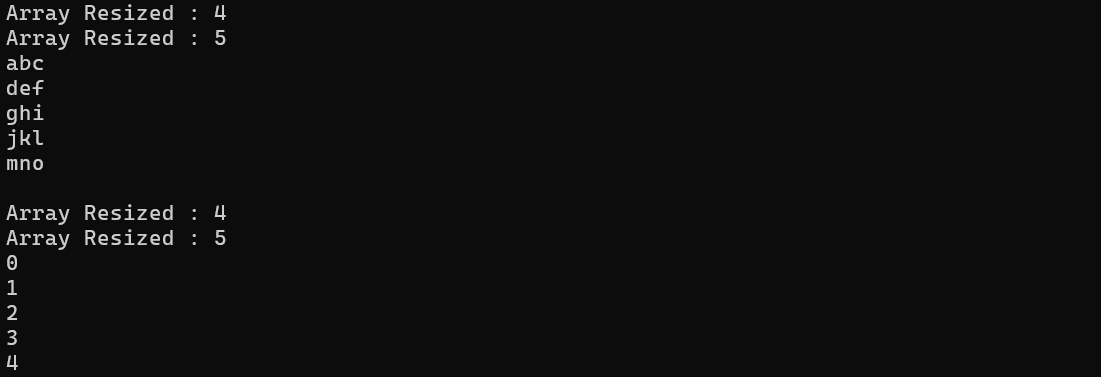
[예제]
using System;
using System.Collections;
using System.Collections.Generic;

namespace EnumerableGeneric
{
    class MyList<T> : IEnumerable<T>, IEnumerator<T>
    {
        private T[] array;
        int position = -1;

        public MyList()
        {
            array = new T[3];
        }

        public T this[int index]
        {
            get
            {
                return array[index];
            }
            set
            {
                if (index >= array.Length)
                {
                    Array.Resize<T>(ref array, index + 1);
                    Console.WriteLine($"Array Resized : {array.Length}");
                }

                array[index] = value;
            }
        }

        public int Length
        {
            get { return array.Length; }
        }

        public IEnumerator<T> GetEnumerator()
        {
            return this;
        }

        IEnumerator IEnumerable.GetEnumerator()
        {
            return this;
        }

        public T Current
        {
            get { return array[position]; }
        }

        object IEnumerator.Current
        {
            get { return array[position];  }
        }

        public bool MoveNext()
        {
            if (position == array.Length - 1)
            {
                Reset();
                return false;
            }

            position++;
            return (position < array.Length);
        }

        public void Reset()
        {
            position = -1;
        }

        public void Dispose()
        {

        }
    }

    class MainApp
    {
        static void Main(string[] args)
        {
            MyList<string> str_list = new MyList<string>();
            str_list[0] = "abc";
            str_list[1] = "def";
            str_list[2] = "ghi";
            str_list[3] = "jkl";
            str_list[4] = "mno";

            foreach(string str in str_list)
                Console.WriteLine(str);

            Console.WriteLine();

            MyList<int> int_list = new MyList<int>();
            int_list[0] = 0;
            int_list[1] = 1;
            int_list[2] = 2;
            int_list[3] = 3;
            int_list[4] = 4;

            foreach (int no in int_list)
                Console.WriteLine(no);
        }
    }
}
'C#' 카테고리의 다른 글
| [C#] 대리자와 이벤트 (0) | 2025.05.09 |
|---|---|
| [C#] 예외 처리 (0) | 2025.05.06 |
| [C#] 컬렉션, 인덱서 (1) | 2025.05.03 |
| [C#] 배열 (0) | 2025.05.02 |
| [C#] 프로퍼티, 레코드 (0) | 2025.04.25 |