'이것이 C#이다 개정판'의 chapter 16을 정리한 글입니다.
리플렉션 (Reflection)
리플렉션은 프로그램이 자기 자신을 검사하고 자신의 구조를 파악할 수 있도록 하는 기능입니다.
프로그램 실행 중에 어셈블리, 모듈, 타입에 대한 메타 데이터에 접근하고, 심지어는 런타임에 객체를 생성하거나 멤버(속성, 메서드, 필드 등)를 호출하는 등의 작업을 수행할 수 있게 해줍니다.
마이크로소프트의 .NET은 모든 형식을 들여다볼 수 있도록, 모든 데이터 형식의 조상인 Object 형식에 GetType( ) 메서드를 만들어놓았습니다.
Object.GetType( ) 메서드와 Type 클래스
모든 데이터 형식은 Object의 자식 격입니다. 그렇기에 모든 데이터 형식은 Object 형식이 갖고 있는 다음의 메서드를 물려받아 갖고 있습니다.
- Equals( )
- GetHashCode( )
- GetType( )
- ReferenceEquals( )
- ToString( )
이 중 GetType( ) 메서드는 Type 형식의 결과를 반환합니다. Type 형식은 .NET에서 사용되는 데이터 형식의 모든 정보를 담고 있습니다.
형식 이름, 소속된 어셈블리 이름, 프로퍼티 목록, 메서드 목록, 필드 목록, 이벤트 목록, 심지어는 이 형식이 상속하는 인터페이스의 목록까지 갖고 있습니다.
[ Object.GetType( ) 메서드와 Type 형식을 사용하는 예시 ]
int a = 0;

Type type = a.GetType();
FieldInfo[] fields = type.GetFields();  // 필드 목록 조회

foreach (FieldInfo field in fields)
    Console.WriteLine("Type : {0}, Name : {1}", field.FieldType.Name, field.Name);
[ Type 형식의 메서드 ]
| 메서드 | 반환 형식 | 설명 |
| GetConstructors( ) | ConstructorInfo[ ] | 해당 형식의 모든 생성자 목록을 반환합니다. |
| GetEvents( ) | EventInfo[ ] | 해당 형식의 이벤트 목록을 반환합니다. |
| GetFields( ) | FieldInfo[ ] | 해당 형식의 필드 목록을 반환합니다. |
| GetGenericArguments( ) | Type[ ] | 해당 형식의 형식 매개변수 목록을 반환합니다. |
| GetInterfaces( ) | Type[ ] | 해당 형식이 상속하는 인터페이스 목록을 반환합니다. |
| GetMembers( ) | MemberInfo[ ] | 해당 형식의 멤버 목록을 반환합니다. |
| GetMehods( ) | MethodInfo[ ] | 해당 형식의 메서드 목록을 반환합니다. |
| GetNestedTypes( ) | Type[ ] | 해당 형식의 내장 형식 목록을 반환합니다. |
| GetProperties( ) | PropertyInfo[ ] | 해당 형식의 프로퍼티 목록을 반환합니다. |
해당 표에 있는 GetFields( )나 GetMEthods( )같은 메서드는 검색 옵션을 지정할 수 있습니다.
public 항목만 조회할 수 있고, public이 아닌 항목만 조회할 수도 있습니다. 이 외에도 여러 조건을 만들 수 있습니다.
이러한 검색 옵션은 System.Reflection.BindingFlags 열거형을 이용해서 구성됩니다.
[ BindingFlags 열거형을 이용해 GetFields( ) 메서드에 검색 옵션을 입력하는 예시 ]
Type type = a.GetType();

// public 인스턴스 필드 조회
var fields1 = type.GetFields( BindingFlags.Public | BindingFlags.Instance );

// 비(非) public 인스턴스 필드 조회
var fields2 = type.GetFields( BindingFlags.NonPublic | BindingFlag.Instance );

// public 정적 필드 조회
var fields3 = type.GetFields( BindingFlag.Public | BindingFlag.Static );

// 비(非) public 정적 필드 조회
var fields4 = type.GetFields( BindingFlag.NonPublic | BindingFlag.Static );
[예제]
using System;
using System.Collections.Generic;
using System.Text;
using System.Reflection;

namespace GetTypeExample
{
    interface TypeValue
    {
        public int Value { get; set; }
        event EventHandler ValueChanged;
    }

    class Typetest : TypeValue
    {
        private int[] array;
        public static readonly string AppName = "MyTestApp";

        public string Name { get; set; }
        public int Value { get; set; }

        public event EventHandler ValueChanged;

        public event EventHandler MyStatusEvent;

        public Typetest()
        {
            array = new int[5];
        }

        public Typetest(string name) : this()
        {
            this.Name = name;
        }

        public int ReturnFirstIndex(int[] arr)
        {
            if (array != null && array.Length > 0)
                return array[0];
            return -1;
        }

        public static string GetAppName()
        {
            return AppName;
        }

        public class PublicNestedClass { }
        private class PrivateNestedClass { }
        protected struct ProtectedNestedStruct { }
        internal enum InternalNestedEnum { A, B, C }
    }


    class MainApp
    {
        static void PrintInterfaces(Type type)
        {
            Console.WriteLine("-------- Interfaces --------");

            Type[] interfaces = type.GetInterfaces();
            foreach (Type i in interfaces)
                Console.WriteLine("Name : {0}", i.Name);

            Console.WriteLine();
        }

        static void PrintFields(Type type)
        {
            Console.WriteLine("-------- Fields --------");

            FieldInfo[] fields = type.GetFields(
                BindingFlags.NonPublic |
                BindingFlags.Public |
                BindingFlags.Static |
                BindingFlags.Instance);

            foreach (FieldInfo field in fields)
            {
                String accessLevel = "protected";
                if (field.IsPublic) accessLevel = "public";
                else if (field.IsPrivate) accessLevel = "private";

                Console.WriteLine("Access : {0}, Type : {1}, Name : {2}",
                    accessLevel, field.FieldType.Name, field.Name);
            }

            Console.WriteLine();
        }

        static void PrintMethods(Type type)
        {
            Console.WriteLine("-------- Methods --------");

            MethodInfo[] methods = type.GetMethods();
            foreach (MethodInfo method in methods)
            {
                Console.Write("Type : {0}, Name : {1}, Parameter : ",
                    method.ReturnType.Name, method.Name);

                ParameterInfo[] args = method.GetParameters();
                for (int i = 0; i < args.Length; i++)
                {
                    Console.Write("{0}", args[i].ParameterType.Name);
                    if (i < args.Length - 1)
                        Console.Write(", ");
                }
                Console.WriteLine();
            }
            Console.WriteLine();
        }

        static void PrintProperties(Type type)
        {
            Console.WriteLine("-------- Properties --------");

            PropertyInfo[] properties = type.GetProperties();
            foreach (PropertyInfo property in properties)
                Console.WriteLine("Type : {0}, Name : {1}",
                    property.PropertyType.Name, property.Name);

            Console.WriteLine();
        }

        static void PrintConstructors(Type type)
        {
            Console.WriteLine("-------- Constructors --------");

            ConstructorInfo[] constructorInfos = type.GetConstructors(
                BindingFlags.Public | BindingFlags.NonPublic | BindingFlags.Instance);
            foreach (ConstructorInfo constructor in constructorInfos)
            {
                String accessLevel = "protected";
                if (constructor.IsPublic) accessLevel = "public";
                else if (constructor.IsPrivate) accessLevel = "private";

                Console.WriteLine("Access : {0}, Name : {1}, Parameters : ",
                    accessLevel, constructor.Name);

                ParameterInfo[] args = constructor.GetParameters();
                for (int i = 0; i < args.Length; i++)
                {
                    Console.Write("{0}", args[i].ParameterType.Name);
                    if (i < args.Length - 1)
                        Console.Write(", ");
                }
                Console.WriteLine();
            }
            Console.WriteLine();
        }

        static void PrintNestedTypes(Type type)
        {
            Console.WriteLine("-------- Nested Types --------");
            Type[] nestedTypes = type.GetNestedTypes(BindingFlags.Public | BindingFlags.NonPublic);

            foreach (Type nestedType in nestedTypes)
            {
                string visibility = "???";
                if (nestedType.IsNestedPublic) visibility = "public";
                else if (nestedType.IsNestedPrivate) visibility = "private";
                else if (nestedType.IsNestedFamily) visibility = "protected";
                else if (nestedType.IsNestedAssembly) visibility = "internal";
                else if (nestedType.IsNestedFamANDAssem) visibility = "private protected";
                else if (nestedType.IsNestedFamORAssem) visibility = "protected internal";


                Console.WriteLine("Visibility : {0}, Name : {1}, BaseType: {2}",
                    visibility, nestedType.Name, nestedType.BaseType.Name);
            }
            Console.WriteLine();
        }

        static void PrintEvents(Type type)
        {
            Console.WriteLine("-------- Events --------");
            EventInfo[] events = type.GetEvents(
                BindingFlags.Public |
                BindingFlags.NonPublic |
                BindingFlags.Instance |
                BindingFlags.Static);

            foreach (EventInfo eventInfo in events)
            {
                Console.WriteLine("Name : {0}, Handler Type : {1}",
                    eventInfo.Name, eventInfo.EventHandlerType.Name);
            }
            Console.WriteLine();
        }

        static void Main(string[] args)
        {
            Typetest typetest = new Typetest();
            Type type = typetest.GetType();

            PrintInterfaces(type);
            PrintFields(type);
            PrintProperties(type);
            PrintMethods(type);
            PrintConstructors(type);
            PrintNestedTypes(type);
            PrintEvents(type);
        }
    }
}
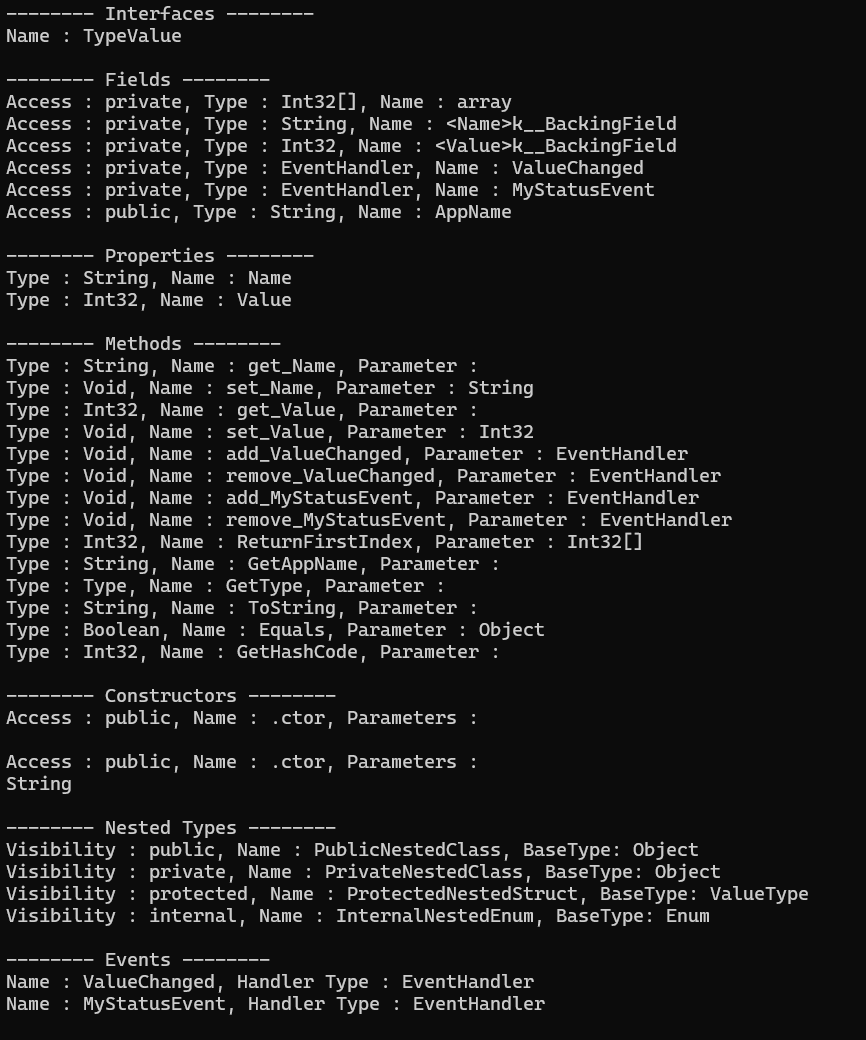
[ 형식 정보를 얻는 방법]
Opbject.GetType( ) 메서드는 반드시 인스턴스가 있어야 호출이 가능합니다.
C#에서는 Object.GetType( ) 외에도 인스턴스 없이 형식 정보를 얻을 수 있는 typeof 연산자와 Type.GetType( ) 메서드를 제공합니다.
typeof 연산자와 Type.GetType( ) 메서드는 똑같이 Type 형식을 반환하지만, typeof 연산자는 형식의 식별자 자체를 인수로 받고 Type.GetType( ) 메서드는 형식의 전체 이름, 즉 네임스페이스를 포함한 형식 이름을 인수로 받는다는 점이 다릅니다.
[예제]
using System;

namespace GetTypeExample
{
    class MainApp
    {
        static void Main(string[] args)
        {
            Console.WriteLine(typeof(int));
            Console.WriteLine(typeof(int).FullName);
            Console.WriteLine(Type.GetType("System.Int32)"));

            Type a = typeof(int);
            Console.WriteLine(a);
            Console.WriteLine(a.FullName);

            Type b = Type.GetType("System.Int32");
            Console.WriteLine(b);
            Console.WriteLine(b.FullName);
        }
    }
}
※ type.FullName
type.FullName은 타입의 네임스페이스를 포함한 완전히 정규화된 이름을 출력하며, 타입을 고유하게 식별하거나 리플렉션으로 타입을 찾을 때 사용됩니다.
리플렉션을 이용해서 객체 생성하고 이용하기
리플렉션을 이용한다면, 특정 형식의 인스턴스를 만들고 데이터를 할당하며 메서드를 호출할 수 있습니다.
이렇게 코드 안에서 런타임에 특정 형식의 인스턴스를 만들 수 있게 되면 프로그램이 조금 더 동적으로 동작할 수 있도록 구성할 수 있습니다.
[동적 인스턴스 생성]
리플렉션을 이용해서 동적으로 인스턴스를 만들기 위해서는 System.Activator 클래스가 필요합니다.
인스턴스를 만들고자 하는 형식의 Type 객체를 매개변수에 넘기면, Activator.CreateInsatnce( ) 메서드는 입력받은 형식의 인스턴스를 생성하여 반환합니다.
object a = Activator.CreateInsatnce(typeof(int));
일반화를 지원하는 버전의 CreateInsatnce( ) 메서드도 있어 가령 List<int>의 인스턴스를 만들 수도 있습니다.
List<int> list = Activator.CreateInsatnce<List<int>>();
이렇게 인스턴스 생성을 동적으로 하는 것이 가능합니다.
뿐만 아니라, 객체의 프로퍼티에 값을 할당하는 것도 동적으로 하는 것이 가능합니다.
[동적 프로퍼티 값 할당]
Type.GetProperties( )의 반환 형식인 PropertyInfo 클래스 객체는 SetValue( )와 GetValue( ) 메서드를 갖는데,
GetValue( ) 메서드를 호출하면 프로퍼티로부터 값을 읽을 수 있고, SetValue( )를 호출하면 프로퍼티에 값을 할당할 수 있습니다.
GetValue( )
- 역할
- PropertyInfo 객체가 나타내는 속성의 값을 특정 객체 인스턴스로부터 가져옵니다.
- 시그니처
- object Get Value (object obj, object[ ] index)
- obj : 값을 가져올 객체 인스턴스입니다. 이 속성이 정의된 타입의 객체여야 합니다.
static 속성의 경우 null을 전달합니다. - index : 선택사항이지만, 인덱서와 같이 인덱스를 사용하는 속성의 경우는 필수적이며,
인덱스 값들을 object 배열로 전달합니다. 일반 속성의 경우 null을 전달합니다.
- obj : 값을 가져올 객체 인스턴스입니다. 이 속성이 정의된 타입의 객체여야 합니다.
- object Get Value (object obj, object[ ] index)
- 반환 값
- 속성의 값을 object 타입으로 반환합니다. 실제 사용시에는 해당 속성의 원래 타입으로 캐스팅이 필요합니다.
SetValue( )
- 역할
- PropertyInfo 객체가 나타내는 속성의 값을 특정 객체 인스턴스에 설정합니다.
- 시그니처
- void SetValue(object obj, object value, object[ ] index)
- obj : 값을 설정할 객체 인스턴스입니다. 이 속성이 정의된 타입의 객체여야 합니다.
static 속성의 경우 null을 전달합니다. - value : 속성에 설정할 새로운 값입니다. 속성 타입에 맞는 값이어야 하며, object 타입으로 전달합니다.
- index : 선택사항이지만, 인덱서의 경우는 필수적이며, 인덱스 값들을 object 배열로 전달합니다.
일반 속성의 경우 null을 전달합니다.
- obj : 값을 설정할 객체 인스턴스입니다. 이 속성이 정의된 타입의 객체여야 합니다.
- void SetValue(object obj, object value, object[ ] index)
[동적 메서드 호출]
메서드의 정보를 담는 MethodInfo 클래스에는 Invoke( )라는 메서드가 존재합니다
해당 메서드를 이용하면 동적으로 메서드를 호출할 수 있습니
Invoke( )
- 역할
- MethodInfo 객체가 나타내는 메서드를 특정 객체 인스턴스에 대해 호출합니다.
- 시그니처
- object? Invoke(object? obj, object?[ ]? parameters)
- obj : 메서드를 호출할 객체 인스턴스입니다. 이 메서드가 정의된 타입의 객체여야 합니다.
인스턴스 메서드를 호출할 때 대상 객체를 전달하며, static 속성의 경우 null을 전달합니다. - parameters: 메서드에 전달할 매개변수들의 배열입니다. 메서드가 매개변수를 받지 않으면 null 또는
빈 object[ ] 배열을 전달합니다. 매개변수를 받으면 각 매개변수 값을 object 타입으로 변환하여
object 배열에 담아 전달합니다.
- obj : 메서드를 호출할 객체 인스턴스입니다. 이 메서드가 정의된 타입의 객체여야 합니다.
- object? Invoke(object? obj, object?[ ]? parameters)
[예제]
using System;
using System.Reflection;

namespace DynamicInstance
{
    class Profile
    {
        private string name;
        private string phone;

        public Profile()
        {
            name = ""; phone = "";
        }

        public Profile(string name, string phone)
        {
            this.name = name;
            this.phone = phone;
        }

        public void Print()
        {
            Console.WriteLine($"{name}, {phone}");
        }

        public string Name
        {
            get { return name; }
            set { name = value; }
        }

        public string Phone
        {
            get { return phone; }
            set { phone = value; }
        }
    }
    class MainApp
    {
        static void Main(string[] args)
        {
            Type type = Type.GetType("DynamicInstance.Profile");
            MethodInfo methodInfo = type.GetMethod("Print");

            PropertyInfo nameProperty = type.GetProperty("Name");
            PropertyInfo phoneProperty = type.GetProperty("Phone");

            object profile = Activator.CreateInstance(type, "김철수", "512-1234");
            methodInfo.Invoke(profile, null);

            profile = Activator.CreateInstance(type);
            nameProperty.SetValue(profile, "박영희", null);
            phoneProperty.SetValue(profile, "997-5511", null);

            Console.WriteLine("{0}, {1}",
                nameProperty.GetValue(profile, null),
                phoneProperty.GetValue(profile, null));
        }
    }
}
리플렉션을 이용해서 형식 내보내기
리플렉션을 이용하면 프로그램 실행 중에 원하는 형식의 정보를 읽어낼 수 있을 뿐 아니라, 그 형식의 인스턴스도 만들 수 있으며 심지어는 프로퍼티나 필드에 값을 할당하고 메서드를 호출할 수도 있습니다.
이렇게 충분히 강력한 기능을 지원하지만, C#은 프로그램 실행 중에 새로운 형식을 만들어 낼 수 있는 기능도 제공합니다.
동적으로 새로운 형식을 만드는 작업은 System.Reflection.Emit 네임스페이스에 있는 클래스들을 통해 이루어집니다.
[ Emit 네임스페이스에서 제공하는 클래스 ]
| 클래스 | 설명 |
| AssemblyBuilder | 동적 어셈블리를 정의하고 나타냅니다. |
| ConstructorBuilder | 동적으로 만든 클래스의 생성자를 정의하고 나타냅니다. |
| CustomAttributeBuilder | 사용자 정의 애트리뷰트를 만듭니다. |
| EnumBuilder | 열거 형식을 정의하고 나타냅니다. |
| EventBuilder | 클래스의 이벤트를 정의하고 나타냅니다. |
| FieldBuilder | 필드를 정의하고 나타냅니다. |
| GenericTypeParameterBuilder | 동적으로 정의된 형식(클래스)과 메서드를 위한 일반화 형식 매개변수를 정의하고 생성합니다. |
| ILGenerator | MSIL(Microsoft Intermediate Language) 명령어를 생성합니다. |
| LocalBuilder | 메서드나 생성자 내의 지역 변수를 나타냅니다. |
| MethodBuilder | 동적으로 만든 클래스의 메서드(또는 생성자)를 정의하고 나타냅니다. |
| ModuleBuilder | 동적 어셈블리 내의 모듈을 정의하고 나타냅니다. |
| OpCodes | ILGenerator 클래스의 멤버를 이용한 내보내기 작업에 사용할 MSIL 명령어의 필드 표현을 제공 합니다. |
| ParameterBuilder | 매개변수 정보를 생성하고 결합시킵니다. |
| PropertyBuilder | 형식(클래스)의 프로퍼티를 정의합니다. |
| TypeBuilder | 실행 중에 클래스를 정의하고 생성합니다. |
이 클래스를 사용하는 요령은 다음 순서와 같습니다.
① AssemblyBuilder를 이용해서 어셈브리를 만듭니다.
② ModuleBuilder를 이용해서 ①에서 생성한 어셈블리 안에 모듈을 만들어 넣습니다.
③ ②에서 생성한 모듈 안에 TypeBuilder로 클래스(형식)를 만들어 넣습니다.
④ ③에서 생성한 클래스 안에 메서드(MethodBuilder 이용)나 프로퍼티(PropertyBuilder 이용)를 만들어 넣습니다.
⑤ ④에서 생성한 것이 메서드라면, ILGenerator를 이용해서 메서드 안에 CPU가 실행할 IL 명령들을 넣습니다.
[예제]
using System;
using System.Reflection;
using System.Reflection.Emit;

namespace EmitTest
{
    class MainApp
    {
        static void Main(string[] args)
        {
            // Code A
            // Create Assembly
            AssemblyBuilder newAssembly =
                AssemblyBuilder.DefineDynamicAssembly(
                new AssemblyName("CalculatorAssembly"),
                AssemblyBuilderAccess.Run);

            // Code B
            // Create Module
            ModuleBuilder newModule = newAssembly.DefineDynamicModule("Calculator");

            // Code C
            // Create Class
            TypeBuilder newType = newModule.DefineType("Sum1To100");

            // Code D
            // Create Method
            MethodBuilder newMethod = newType.DefineMethod(
                "Calculate",
                MethodAttributes.Public,
                typeof(int),    // 반환 형식
                new Type[0]);   // 매개변수

            // Code E
            // Create IL Commands to by executed by the method
            ILGenerator generator = newMethod.GetILGenerator();

            generator.Emit(OpCodes.Ldc_I4, 1);

            for (int i = 2; i <= 100; i++)
            {
                generator.Emit(OpCodes.Ldc_I4, i);
                generator.Emit(OpCodes.Add);
            }

            generator.Emit(OpCodes.Ret);

            // Sum1To100 Class Emit to CLR
            newType.CreateType();

            // Generate Dynamic Instance of new type
            object sum1To100 = Activator.CreateInstance(newType);
            MethodInfo Calculate = sum1To100.GetType().GetMethod("Calculate");
            Console.WriteLine(Calculate.Invoke(sum1To100, null));
        }
    }
}
[Code A]
어셈블리를 만드는 구현부입니다.
어셈브리를 만들기 위해 AssemblyBuilder 클래스를 이용해야겠지만, AssemblyBuilder는 스스로를 생성하는 생성자가 없습니다.
그래서 다른 팩토리 클래스의 도움을 받아야 하는데, DefineDynamicAssembly( ) 메서드를 호출하면 AssemblyBuilder의 인스턴스를 만들 수 있습니다.
DefineDynamicAssembly( ) 메서드는 System.Reflection.Emit 네임스페이스에 있는 AssemblyBuilder 클래스의 정적 메서드입니다. 이 메서드는 AssemblyBuilder 클래스 자체에 속해 있으며, 특정 AssemblyBuilder 객체의 인스턴스가 없어도 호출이 가능합니다.
[Code B]
모듈을 만드는 구현부입니다.
모듈은 어셈블리의 내부에 생성되는데, AssemblyBuilder가 동적 모듈을 생성하는 DefineDynamicModule( ) 메서드를 갖고 있으므로 해당 메서드를 호출해 모듈을 만들 수 있습니다.
[Code C]
클래스를 만드는 구현부입니다. ModuleBuilder의 DefineType( ) 메서드를 이용해서 클래스 생성이 가능합니다.
[Code D]
메서드를 만드는 구현부입니다. TypeBuilder 클래스의 DefineMethod( ) 메서드를 호출해서 메서드 생성이 가능합니다.
DefineMethod( )는 여러 오버로드가 있지만, 일반적으로 다음 정보를 매개변수로 받습니다.
- name (string)
- 메서드의 이름입니다.
- attributes (MethodAttributes)
- 메서드의 특성(Public, Private, Static, Virtual, Abstract 등)을 지정합니다.
여러 특성은 '| 연산자'로 조합합니다.
- 메서드의 특성(Public, Private, Static, Virtual, Abstract 등)을 지정합니다.
- returnType (Type)
- 메서드의 반환 타입을 System.Type 객체로 지정합니다. 주로 typeof( ) 연산자를 사용합니다.
- parameterTypes (Type[ ])
- 메서드가 받을 매개변수들의 타입 목록을 System.Type 객체의 배열로 지정합니다.
매개변수가 없으면 null 또는 빈 Type[ ] 배열을 전달합니다.
- 메서드가 받을 매개변수들의 타입 목록을 System.Type 객체의 배열로 지정합니다.
[Code E]
메서드가 실행할 코드(IL 명령어)를 만드는구현부입니다.
- OpCodes.Ldc_I4
- OpCodes.Ldc_I4 명령어는 주어진 32비트 정수 상수 값을 평가 스택(Evaluation Stack)에 푸시하는 역할을 합니다.
- Ldc_14는 "Load Constant Int32"의 약자입니다.
- Ld : Load / 값을 로드하여 스택에 넣습니다.
- c : Constant / 상수 값
- I4 : Int32 / 32비트 정수, 즉 C#의 int
- generator.Emit(OpCodes.Ldc_I4, 1);
- 32비트 정수 1을 계산 스택에 넣습니다.
- generator.Emit(OpCodes.Add);
- 해당 구현부에서는 계산 후 계산 스택에 담겨 있는 두 개의 값을 꺼내서 더한 후, 그 결과를 다시 계산 스택에 넣습니다.
- generator.Emit(OpCodes.Ret);
- 계산 스택에 담겨 있는 값을 반환합니다.
- Ret 명령어가 실제로 실행되는 것은 나중에 동적으로 생성된 메서드를 호출하여 실행할 때이며,
이때 계산된 반환 값은 메서드를 호출한 측으로 전달되어 해당 호출 측의 변수에 저장됩니다.
어트리뷰트 (Attribute)
어트리뷰트는 코드에 대한 부가 정보를 기록하고 읽을 수 있는 기능입니다.
물론 주석을 이용해도 코드에 대한 부가 정보를 기록하고 읽을 수 있습니다. 하지만, 어트리뷰트는 사람이 작성하고 컴퓨터가 읽기 위한 기능입니다.
※ 메타데이터 (Metadata)
메타데이터란 데이터의 데이터를 말합니다.
C# 코드도 데이터지만 이 코드에 대한 정보, 즉 데이터의 데이터가 존재합니다. 이를 메타데이터라고 하는 것입니다.
어트리뷰트나 리플렉션을 통해 얻는 모든 부가 정보들 또한 C# 코드의 메타데이터라고 할 수 있습니다.
어트리뷰트를 이용해서 클래스나 구조체, 메서드, 프로퍼티 등에 데이터를 기록해두면 C# 컴파일러나 C#으로 작성된 프로그램이 이 정보를 읽고 사용할 수 있습니다.
[ 어트리뷰트_이름( 어트리뷰트_매개변수 ) ]
public void MyMethod()
{
    // ...
}
[ 어트리뷰트가 필요한 이유 ]
어트리뷰트는 코드 자체의 실행 로직에 영향을 주지 않으면서, 해당 코드 요소에 대한 정보를 프레임워크, 라이브러리, 개발 도구 등에 전달하여, 이 정보를 읽어서 자신들의 동작 방식을 결정하고 해당 요소를 다르게 처리할 수 있도록 하기 위해 필요합니다.
간단히 말해, 어트리뷰트는 "이 코드 요소는 이러이러한 특징이 있으니, 이 코드를 사용하는 쪽은 이 특징을 보고 다르게 처리해 주세요"라고 코드 자체에 붙이는 '표지'나 '꼬리표' 역할을 하는 것입니다.
[예제]
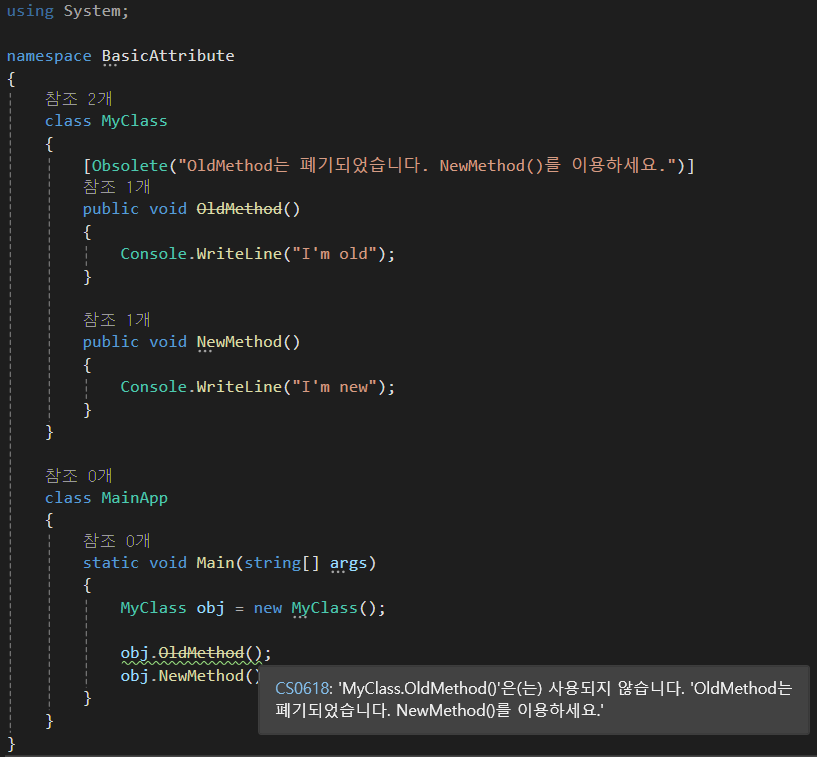

호출자 정보 어트리뷰트
호출자 정보는 메서드의 매개변수에 사용되며 메서드의 호출자 이름, 호출자 메서드가 정의된 소스 파일 경로, 심지어는 소스 파일 내의 행 번호까지 알 수 있습니다.
이것을 이용해서 응용 프로그램의 이벤트를 로그 파일이나 화면에 출력하면 그 이벤트가 어떤 코드에서 일어났는지 알 수 있습니다.
[호출자 정보 어트리뷰트 ]
| 어트리뷰트 | 설명 |
| CallerMemberNameAttribute | 현재 메서드를 호출한 메서드 또한 프로퍼티의 이름을 나타냅니다. |
| CallerFilePathAttribute | 현재 메서드가 호출된 소스 파일 경로를 나타냅니다. 이때 경로는 소스 코드를 컴파일할 때의 전체 경로를 나타냅니다. |
| CallerLineNumberAttribute | 현재 메서드가 호출된 소스 파일 내의 행(Line) 번호를 나타냅니다. |
[예제]
using System;
using System.Runtime.CompilerServices;

namespace CallerInfo
{
    public static class Trace
    {
        public static void WriteLine(string message,
            [CallerFilePath] string file = "",
            [CallerLineNumber] int line = 0,
            [CallerMemberName] string member = "")
        {
            Console.WriteLine($"{file} (Line ; {line}) {member} : {message}");
        }
    }

    class MainApp
    {
        static void Main(string[] args)
        {
            Trace.WriteLine("즐거운 프로그래밍!");
        }
    }
}
사용자 정의 어트리뷰트
.NET이 제공하는 어트리뷰트는 Obsolete 말고도 그 종류가 상당히 많습니다.
많은 어트리뷰트를 모두 아는 것도 좋지만, 그 자체보다 용도를 중심으로 아는 것이 더 중요합니다.
그렇기에 어트리뷰트를 직접 만들어보고 활용하는 것이 더 중요할 것입니다.
어트리뷰트도 하나의 클래스이기 때문에, 어트리뷰트를 만들기 위해서는 System.Attribute 클래스의 상속을 받는 클래스를 만듭니다. 그리고 이렇게 선언한 어트리뷰트는 Obsolete 어트리뷰트처럼 대괄호 안에 어트리뷰트 이름을 넣어 사용하면 됩니다.
class History : System.Attribute
{
    // ...
}

[Histroy]
class MyClass
{
    // ...
}
어트리뷰트를 만들 때 System.AttributeUsage라는 어트리뷰트의 도움을 받는다면,
어떤 대상을 설명할지, 이 어트리뷰트를 중복해서 사용할 수 있는지의 여부 등을 고려하여 만들 수 있습니다.
System.AttributeUsage는 다음 예제와 같이 어트리뷰트 선언부에 사용하면 됩니다.
[System.AttributeUsage(System.AttributeTargets.Class, AllowMultiple = true)]
class History : System.Attribute
{
    // ...
}
[ Attribute Target ]
| Attribute Target | 설명 |
| All | 아래의 나머지 모든 요소 |
| Assembly | 어셈블리 |
| Module | 모듈 |
| Interface | 인터페이스 |
| Class | 클래스 |
| Struct | 구조체 |
| ClassMembers | 클래스 안에 선언된 클래스나 구조체를 포함한 클래스의 모든 멤버 |
| Constructor | 생성자 |
| Delegate | 대리자 |
| Enum | 열거형 |
| Event | 이벤트 |
| Field | 필드 |
| Property | 프로퍼티 |
| Method | 메서드 |
| Parameter | 메서드의 매개변수 |
| ReturnValue | 메서드의 반환 값 |
Attribute Target을 지정할 때, 논리합 연산자를 이용해 Target을 결합할 수도 있습니다.
[ AllowMultiple ]
해당 매개변수를 true로 설정하면, 어트리뷰트를 여러 번 사용할 수 있게 됩니다.
만약 해당 변수를 true로 설정하지 않는다면, 어트리뷰트 특성이 중복되었다는 메시지와 함께 컴파일이 되지 않습니다.
[예제]
using System;

namespace CustomAttribute
{
    [System.AttributeUsage(System.AttributeTargets.Class, AllowMultiple = true)]
    class History : System.Attribute
    {
        private string programmer;
        public double version;
        public string changes;

        public History(string programmer)
        {
            this.programmer = programmer;
            version = 1.0;
            changes = "First release";
        }

        public string GetProgrammer()
        {
            return programmer;
        }
    }

    [History("Sean", version = 0.1, changes = "2024-05-13 Created Class stub")]
    [History("Bob", version = 0.2, changes = "2025-05-13 Added Func() Method")]
    class MyClass
    {
        public void Func()
        {
            Console.WriteLine("Func()");
        }
    }

    class MainApp
    {
        static void Main(string[] args)
        {
            Type type = typeof(MyClass);
            Attribute[] attributes = Attribute.GetCustomAttributes(type);

            Console.WriteLine("MyClass change history...");

            foreach(Attribute a in attributes)
            {
                History h = a as History;
                if (h != null)
                    Console.WriteLine("Ver : {0}, Programmer : {1}, Changes : {2}",
                        h.version, h.GetProgrammer(), h.changes);
            }
        }
    }
}
'C#' 카테고리의 다른 글
| [C#] 파일과 디렉터리 다루기, 스트림, 객체 직렬화 (0) | 2025.05.23 |
|---|---|
| [C#] dynamic (0) | 2025.05.16 |
| [C#] LINQ (0) | 2025.05.12 |
| [C#] 람다식, 식 트리 (0) | 2025.05.12 |
| [C#] 대리자와 이벤트 (0) | 2025.05.09 |