이 글은 해당 유튜브를 보고 진행한 것에 대해 공부한 것을 정리한 글입니다.
커맨드 패턴

커맨드 패턴은 메서드 호출을 객체로 래핑하는 디자인 패턴입니다. 즉, 행동 자체를 하나의 오브젝트로 표현할 수 있게 해줍니다.
메서드를 직접 호출하는 대신 커맨드 패턴을 사용하면, '커맨드 오브젝트'라는 하나 이상의 메서드 호출을 캡슐화할 수 있습니다.
즉, 행동 자체를 "값처럼" 다룰 수 있게 만든 것이 커맨드 패턴의 핵심입니다.
이렇게 만들어진 커맨드 오브젝트는 큐(queue), 스택(stack) 등의 자료구조에 저장될 수 있으며, 이를 통해 행동의 실행 순서나 취소 등을 제어할 수 있습니다.
즉, 작은 커맨드 버퍼로 작동하며, 실행 타이밍을 유연하게 제어할 수 있게 해줍니다.
장점
명령과 실행 주체의 분리
- 각 요청을 객체의 형태로 캡슐화하여 명령을 실행하는 객체(Receiver)와 명령을 내리는 객체(Invoker)를 분리할 수 있습니다.
- 단일 책임 원칙(SRP)을 준수합니다.
새로운 명령 쉽게 추가
- 새로운 명령을 추가할 때 기존 코드를 수정할 필요 없이 새로운 행동을 추가할 수 있습니다.
- 새로운 ConcreteCommand 클래스를 추가하면 됩니다.
- 개방/폐쇄 원칙(OCP)을 준수합니다.
요청 저장 및 로그화
- 서로 다른 요청들을 큐에 저장하거나 로그로 기록하는 등의 처리가 가능합니다.
- 따라서 모든 명령을 기록하거나 되돌리는 기능을 쉽게 구현할 수 있습니다.
결합도 감소 & 유연한 파라미터 관리
- 명령을 객체로 추상화하여 결합도를 줄임으로써 코드의 유연성과 재사용성을 높입니다.
- 동일한 명령에 대해 다양한 매개변수를 사용할 수 있어, 명령을 더욱 유연하게 정의할 수 있습니다.
단점
구조 복잡성 증가
- 명령, 수신자, 호출자 등 다양한 클래스가 필요해 초기 설계 및 구조가 복잡할 수 있습니다.
클래스 수가 증가
- 명령마다 별도의 새로운 ConcreteCommand 클래스를 정의해야 하므로 클래스가 급격히 많아질 수 있습니다.
오버헤드 발생
- 명령 객체를 생성하고 저장 / 관리하는 비용이 발생할 수 있습니다.


인터페이스를 활용한 커맨드 패턴 구현
ICommand 인터페이스
 public interface ICommand
 {
     public void Execute();
     public void Undo();
 }
인터페이스를 활용한 커맨드 패턴을 구현할 때는, 모든 게임플레이 행동이 인터페이스를 적용합니다.
(추상 클래스로도 구현 가능합니다.)
모든 커맨드 오브젝트는 인터페이스를 구현하여 자체 Execute 및 Undo 메서드를 처리합니다.
따라서 게임에 더 많은 커맨드를 추가해도 기존의 커맨드에는 아무런 영향을 주지 않습니다.
CommandInvoker 클래스 : 실행 및 실행 취소 관리
 public class CommandInvoker
 {
    private static Stack<ICommand> undoStack = new Stack<ICommand>();

    public static void ExecuteCommand(ICommand command)
    {
        command.Execute();
        undoStack.Push(command);
    }

    public static void UndoCommand()
    {
        if (undoStack.Count > 0)
        {
            ICommand activeCommand = undoStack.Pop();
            activeCommand.Undo();
        }
    }
 }
커맨드를 실행 및 취소하기 위해 CommandInvoker 클래스를 생성합니다.
ExecuteCommand 및 UndoCommand 메서드와 더불어, 커맨드 오브젝트의 시퀀스를 포함하기 위한 undo 스택이 있습니다.
PlayerMover 클래스 : 플레이어의 위치 이동 처리
 public class PlayerMover : MonoBehaviour
 {
    [SerializeField] private LayerMask obstacleLayer;
    private const float boardSpacing = 1f;

    public void Move(Vector3 movement)
    {
        transform.position = transform.position + movement;
    }

    public bool IsValidMove(Vector3 movement)
    {
        return !Physics.Raycast(transform.position, movement,boardSpacing, obstacleLayer);
    }
 }
PlayerMover 클래스는 플레이어의 위치 이동을 처리합니다.
MoveCommand 클래스 : 행동을 객체로 캡슐화
 public class MoveCommand : ICommand
 {
    PlayerMover playerMover;
    Vector3 movement;

    public MoveCommand(PlayerMover player, Vector3 moveVector)
    {
        this.playerMover = player;
        this.movement = moveVector;
    }

    public void Execute()
    {
        playerMover.Move(movement);
    }

    public void Undo()
    {
        playerMover.Move(-movement);
    }
 }
Move를 직접 호출하는 대신, ICommand 인터페이스를 구현하는 새로운 클래스인 MoveCommand를 만듭니다.
커맨드 패턴을 따르기 위해 PlayerMover의 Move 메서드를 오브젝트로 캡처합니다.
즉, playerMover와 movement라는 행동의 대상과 파라미터를 캡처해서, 나중에 Execute( )를 호출하면 실제 playerMover.Move()가 실행되도록 만든 객체를 생성한다는 것입니다.
ICommand 인터페이스를 구현하여, 행동을 실행하는 Execute() 메서드와 실행을 취소하는 Undo() 메서드를 정의합니다.
커맨드 오브젝트를 만들고 필요한 파라미터를 저장하면,
추후 CommandInvoker가 커맨드를 실행할 때 CommandInvoker의 정적 ExecuteCommand 및 UndoCommand 메서드가 MoveCommand에 전달됩니다.
그러면 MoveCommand의 Execute 또는 Undo가 실행되며 실행 취소 스택에서 커맨드 오브젝트를 추적합니다.
InputManager에서 커맨드 실행
 private void RunPlayerCommand(PlayerMover playerMover, Vector3 movement)
 {
    if (playerMover == null)
    {
        return;
    }

    if (playerMover.IsValidMove(movement))
    {
        ICommand command = new MoveCommand(playerMover, movement);
        CommandInvoker.ExecuteCommand(command);
    }
}
InputManager는 PlayerMover의 Move 메서드를 직접 호출하지 않고,
대신 RunMoveCommand 메서드를 추가하여 새로운 MoveCommand를 만들고 CommandInvoker로 전송합니다.
그러면 최종적으로 PlayerMover는 MoveCommand에 따라 움직이게 됩니다.
Undo와 Redo의 동작 원리

Undo와 Redo, 두 가지 작업이 모두 필요할 때는 두 가지 스택을 만듭니다.
새로운 커맨드가 발생하면 Undo Stack에 담고, Undo를 실행하면 ReDo Stack에 담습니다.
만약 Redo를 하면 다시 Undo Stack에 담고, Undo를 다시하면 Redo Stack에 담습니다.
이런 식으로 Undo Stack과 Redo Stack을 왔다갔다 하면서 커맨드 오브젝트를 추적하여 커맨드를 수행합니다.
만약 Undo를 여러번 실행한 후, 새로운 커맨드가 발생했을 때 다시 Redo를 하지 못합니다.
여러번 수행한 Undo 커맨드가 Redo Stack으로 이동하게 되고, 이 때 새로운 커맨드가 발생하면 새로운 커맨드는 Undo Stack으로 이동하게 됩니다.
이런 경우에 Redo Stack으로 이동한 Undo 커맨드는 더 이상 유효한 경로가 아니게 되고, 이 시점에서 Redo 스택을 비워버립니다.
그렇기 때문에 Undo를 여러번 실행한 후, 새로운 커맨드가 발생한다면 다시 Redo를 하지 못하게 되는 것입니다.
Command Pattern 예시

public class InputManager : MonoBehaviour
{
    // UI Button controls
    [Header("Button Controls")]
    [SerializeField] Button forwardButton;
    [SerializeField] Button backButton;
    [SerializeField] Button leftButton;
    [SerializeField] Button rightButton;
    [SerializeField] Button undoButton;
    [SerializeField] Button redoButton;
    [SerializeField] private PlayerMover player;

    private void Start()
    {
        // button setup
        forwardButton.onClick.AddListener(OnForwardInput);
        backButton.onClick.AddListener(OnBackInput);
        rightButton.onClick.AddListener(OnRightInput);
        leftButton.onClick.AddListener(OnLeftInput);
        undoButton.onClick.AddListener(OnUndolnput);
        redoButton.onClick.AddListener(OnRedolnput);
    }

    // ...

}
public class InputManager : MonoBehaviour
{
    // ...

    private void RunPlayerCommand(PlayerMover playerMover, Vector3 movement)
    {
        // ...

        // check if movement is unobstructed
        if (playerMover.IsValidMove(movement))
        {
            // issue the command & save to undo stack
            ICommand command = new MoveCommand(playerMover, movement);
            // we run the command immediately here
            CommandInvoker.ExecuteCommand(command);
        }
    }

    private void OnLeftInput()
    {
        RunPlayerCommand(player, Vector3.left);
    }

    private void OnRightInput()
    {
        RunPlayerCommand(player, Vector3.right);
    }

    private void OnUndolnput()
    {
        CommandInvoker.UndoCommand();
    }

    private void OnRedolnput()
    {
        CommandInvoker.RedoCommand();
    }
}
public class CommandInvoker
{
// stack of command objects to undo
private static Stack<ICommand> undoStack = new Stack<ICommand>();
// second stack of redoable commands
private static Stack<ICommand> redoStack = new Stack<ICommand>();
// execute a command object directly and save to the undo stack
public static void ExecuteCommand(ICommand command)
{
command.Execute();
undoStack.Push(command);
// clear out the redo stack if we make a new move
redoStack.Clear();
}
public static void UndoCommand()
{
if (undoStack.Count > 0)
{
ICommand activeCommand = undoStack.Pop();
redoStack.Push(activeCommand);
activeCommand.Undo();
}
}
public static void RedoCommand()
{
if (redoStack.Count > 0)
{
ICommand activeCommand = redoStack.Pop();
undoStack.Push(activeCommand);
activeCommand.Execute();
}
}
}Undo와 Redo를 Queue로 구현한다면?
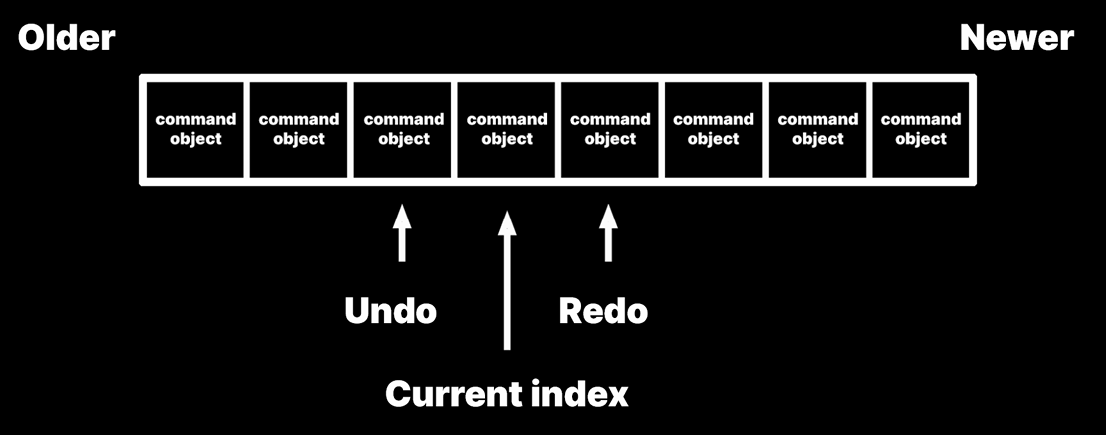
Undo와 Redo는 기본적으로 후입선출(LIFO)로 처리되어야 합니다.
그렇기 때문의 LIFO의 특징을 가지고 있는 Stack이 적합합니다.
그런데, 만약 Undo와 Redo를 Queue로 구현한다면, Queue의 특성 상 먼저 들어온 순서대로 처리를 하게 됩니다.
즉, 선입선출(FIFO)로 동작을 하게 됩니다.
그렇기 때문에 Undo와 Redo는 Stack으로 구현하는 것이 옳은 방향성입니다.
Queue를 사용하는 적절한 예시
Queue는 보통 다음과 같은 경우에 적합합니다.
- 커맨드 큐 시스템
- 여러 명령을 순차적으로 처리할 때
- ex. AI 행동 처리, 네트워크 패킷 처리
- 비동기 작업 처리
- Unity에서 코루틴이나 이벤트 대기열 시스템 등
- 명령 버퍼
- GPU 커맨드 큐, 입력 버퍼 등 일정 순서를 유지해야 하는 곳
Queue로 구현한 콤보 : 커맨드 패턴 예시

해당 예시는 커맨드 패턴 기반의 콤보 입력 시스템이며, 입력된 명령을 큐(Queue)로 관리하고, 특정 순서에 따라 콤보 기술로 변환하는 로직을 구현하고 있습니다.
IGameplayActionCommand 인터페이스
public interface IGameplayActionCommand
{
    void ExecuteAction(); // Implement this method to execute the action.

    public class DPadUpActionCommand : IGameplayActionCommand
    {
        // Example: Injecting a PlayerCharacter dependency
        // private PlayerCharacter _playerCharacter;

        // Example: Constructor with PlayerCharacter parameter
        // public DPadUpActionCommand(PlayerCharacter playerCharacter)
        // {
        //     _playerCharacter = playerCharacter;
        // }
    }

     public void ExecuteAction()
     {
         // Example: Actual game logic for the character jump
         // _playerCharacter.Jump();
     }
}
역할
- 입력된 게임 행동(액션)을 커맨드 객체로 표현하는 기본 인터페이스입니다.
- ExecuteAction()을 통해 실제 게임 로직을 실행하게 됩니다.
- 내부의 DPadUpActionCommand는 '위 방향 입력'같은 구체적인 커맨드의 예시입니다.
- 이러한 클래스들이 조합되어 콤보 패턴을 구성합니다.
ButtonActionController
public class ButtonActionController : MonoBehaviour
{
    private SideFighterControls _gameplayControls;
    private GameplayActionCommandInvoker _actionlnvoker;
    private ComboActionQueueManager_queueManager;

    // Initializes the controller with the necessary dependencies for action command processing.
    // <param name="gameplayControls">The controls setup for the game. </param>
    // <param name="invoker">The invoker responsible for command execution .< /param>
    // <param name="queueManager">The manager handling the command queue for combos .< /p

    // Registers button press event handlers that create and process action commands.
    private void SetupActions()
    {
        _gameplayControls.gameplay.x.performed += ctx => HandleXButtonActionCommand();
        _gameplayControls.gameplay.y.performed += ctx => HandleYButtonActionCommand();
        _gameplayControls.gameplay.a.performed += ctx => HandleAButtonActionCommand();
        _gameplayControls.gameplay.b.performed += ctx => HandleBButtonActionCommand();
    }

    // Below are handlers for each button press. They create a new command instance specific to the button,
    // add it to the combo sequence, and then execute the command.
    private void HandleXButtonActionCommand()
    {
        var xButtonCommand = new XButtonActionCommand();
        AddToComboSequence(xButtonCommand);
        ExecuteActionCommand(xButtonCommand);
    }

    // ...

    // Adds the given command to the sequence being tracked for combo possibilities.
    private void AddToComboSequence(IGameplayActionCommand command)
    {
        _queueManager.AddCommandToComboSequence(command);
    }

    private void ExecuteActionCommand(IGameplayActionCommand command)
    {
        _actionInvoker.ExecuteCommand(command);
    }
}
역할
- 플레이어의 버튼 입력(X, Y, A, B 등)을 처리하는 클래스입니다.
- 버튼이 눌릴 때마다 해당하는 커맨드 객체를 생성하고, 콤보 추적을 위해 Queue에 저장합니다.
이후 즉시 커맨드를 실행합니다. - 입력 핸들러와 커맨드 실행 / 추적 사이의 연결 고리 역할을 합니다.
ComboActionQueueManager
public class ComboActionQueueManager: MonoBehaviour
{
    [SerializeField] private ComboActionCommandFactory _comboActionCommandFactory;

    private Queue<IGameplayActionCommand>_comboSequence;
    private ComboMatchEngine _comboMatchEngine;

    private void Awake()
    {
        _comboSequence = new Queue<IGameplayActionCommand>();
        _comboMatchEngine
            = new ComboMatchEngine(this, _comboActionCommandFactory, _minimumComboLength)
    }

    private void EnqueueCommandAndResetTimers(IGameplayActionCommand command)
    {
        _comboSequence.Enqueue(command);

        if (IsFirstCommandInSequence())
        {
            _timeSinceFirstCombolnput = 0;
        }

        timeSinceLastCombolnput = 0:

        // ...
    }
    // ...
}
역할
- 콤보 입력 추적을 위한 커맨드 큐를 관리합니다.
- 새로운 입력이 발생할 때마다 커맨드 큐에 추가하고, 타이머를 초기화하거나, 첫 입력 타이밍을 추적합니다.
- 콤보 시퀀스의 유효성 판단이나 콤보 종료 타이밍 같은 로직을 포함합니다.
ComboDownRightA : 콤보 규칙 클래스
public class ComboDownRightA : IComboRule
{
    private ComboActionCommandFactory _comboActionCommandFactory;

    public int ComboLength { get; private set; }

    public ComboDownRightA(ComboActionCommandFactory actionCommandFactory)
    {
        _comboActionCommandFactory = actionCommandFactory;
        ComboLength = 3;
    }

    public bool IsFirstConditionMet(IGameplayActionCommand firstCommand)
    {
        return firstCommand is DPadDownActionCommand;
    }

    public bool IsMatch(IEnumerable<IGameplayActionCommand> sequence)
    {
        var sequenceArray = sequence. Take(ComboLength). ToArray();

        // ...

        var first = sequenceArray[0];
        var second = sequenceArray[1];
        var third = sequenceArray[2];

        return first is DPadDownActionCommand && second is DPadRightActionCommand
            && third is AButtonActionCommand;
    }

    // Produces the combo action command associated with the "\>+B" pattern.
    public IGameplayActionCommand GetResultingComboCommand()
    {
        return _comboActionCommandFactory.CreateAdokenCommand();
    }

    // ...

    public bool IsFirstConditionMet(IGameplayActionCommand firstCommand)
    {
        return firstCommand is DPadDownActionCommand;
    }

    // ...

}
역할
- 특정 입력 순서가 정의된 콤보 조건에 부합하는지 확인하는 룰 클래스입니다.
- 입력 시퀀스(sequence)를 보고 이 콤보가 성립하는지 IsMatch를 통해 검사합니다.
- 콤보가 성립되면 GetResultingComboCommand()를 통해 실제로 실행할 커맨드를 생성합니다.
ComboMatchEngine
public class ComboMatchEngine
{
    private ComboActionQueueManager _actionQueueManager;
    private ComboActionCommandFactory _comboActionCommandFactory;
    private List<IComboRule> _comboRules;
    private int _minimumComboLength;

    // ...

    private void InitializeComboRules()
    {
        // Define the specific combo rules that this engine will recognize.
        // This setup allows for easy extension of the game's combo system by adding new rules.
        _comboRules = new List<IComboRule>()
        {
            new ComboXXY(_comboActionCommandFactory),
            new ComboUpB(_comboActionCommandFactory),
            new ComboDownRightA(_comboActionCommandFactory)
        };
    }

    // ...

    internal bool CanStartCombo(Queue<IGameplayActionCommand> comboSequence)
    {
        return DoesFirstActionStartCombo(comboSequence);
    }

    private bool DoesFirstActionStartCombo(Queue<IGameplayActionCommand> comboSequence)
    {
        foreach (var rule in _comboRules)
        {
            if (rule.IsFirstConditionMet(comboSequence.Peek()))
            {
                return true;
            }
        }

        return false;
    }

    // ...

    private IGameplayActionCommand CheckSequenceForCombo(
        Queue<IGameplayActionCommand>comboSequence)

    // Iterates over the entire combo sequence
    // to check for potential combos starting at each point.
    for (int startIndex = 0; startIndex <= comboSequence.Count; startIndex++)
    {
        var subsequence = GetSubsequence(comboSequence, startIndex);

        foreach (IComboRule rule in _comboRules)
        {
            if (rule.IsMatch(subsequence))
            {
                return rule.GetResultingComboCommand();
            }
        }
    }

    return null;

    // ...
}
역할
- 현재 큐에 쌓인 커맨드 시퀀스를 받아 정의된 콤보 룰에 일치하는지 검사하는 핵심 로직을 가지고 있습니다.
- 등록된 IComboRule 목록을 순회하면 일치 여부를 판단합니다.
- 정해진 최소 입력 수 이상일 때만 콤보 탐색을 시작하고, 일치하는 콤보가 있다면 그에 맞는 결과 커맨드를 반환합니다.
특징
- 만약 콤보를 확장하고 싶다면, IComboRule 인터페이스를 구현한 클래스를 추가하여, ComboMatchEngine의 InitializeComboRules()에서 초기화해주면 됩니다.
전체 구조 요약
| [Button 입력] ↓ ButtonActionController ↓ 생성 및 전달 IGameplayActionCommand (X, Y, A 등) ↓ ComboActionQueueManager → 커맨드 Queue 에 저장 ↓ ComboMatchEngine → 큐 내 커맨드가 콤보 조건에 부합하는지 검사 ↓ 일치 시 → 콤보 커맨드 실행 |
'Unity' 카테고리의 다른 글
| [Unity] 디자인패턴 : Object Pool (1) | 2025.06.16 |
|---|---|
| [Unity] 디자인 패턴 : Factory 패턴 (0) | 2025.06.16 |
| [Unity] 디자인 패턴 : Observer 패턴 (2) | 2025.06.13 |
| [Unity] 디자인 패턴 : State 패턴 (0) | 2025.06.10 |
| [Unity] 디자인 패턴 : SOLID 원칙 (1) | 2025.06.09 |